> For the complete documentation index, see [llms.txt](https://wiki.dcrops.com/llms.txt). Markdown versions of documentation pages are available by appending `.md` to page URLs; this page is available as [Markdown](https://wiki.dcrops.com/dcrops-community/other-dcrops-frequently-asked-questions.md).
# Other dCrops Frequently Asked Questions
This section will address frequently asked questions from dCrops players in the Discord Server.
## :regional\_indicator\_q: : How much money do you need to invest in order to play?
:regional\_indicator\_a: : Usually a Starter pack should get you going;
* 4 BETA PACKS from [**https://www.dcrops.com/packs**](https://www.dcrops.com/packs)
* 3 ALPHA PACKS from [**https://www.leodex.io/market/DCALPHA**](https://www.leodex.io/market/DCALPHA)
{% hint style="success" %}
**A total of 70 Hive should get you started with the above packs.**
{% endhint %}
Alternatively, you could also just get single NFTs at **\[**[**https://www.dcrops.com/market**](https://www.dcrops.com/market)**]**
* 1 Average Farmland
* 1 spring seed - broccoli
* 1 summer seed - turnip
* 1 fall seed - carrot
* 1 winter seed - peas
{% hint style="success" %}
**The above listed should amount to 25-30 Hive \[allow for +/- in price]. If invest for both Packs and Single NFTs \[70 Hive + 30 Hive = 100 Hive] , you will get started very nicely.**
{% endhint %}
## :regional\_indicator\_q: : I have an Alpha pack in Leodex/Tribaldex, but it's not showing up in-game. How can I transfer it in-game?
:regional\_indicator\_a: : You have to go to the **PLAY** section as indicated by arrow :arrow\_right:**1**
* On your Dashboard, click on the pack and token information Box as indicated by arrow :arrow\_right:**2**
A dialog Box will open on your dashboard.
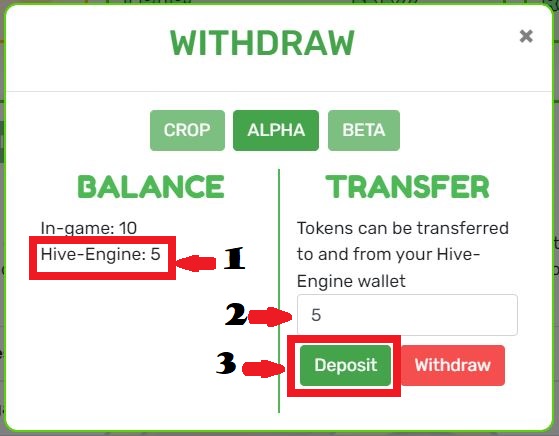
* Check to view the number of Packs you have on Hive-Engine as indicated by arrow :arrow\_right:**1**
* Enter in the desired number of Packs you wish to Deposit In-game as indicated by arrow :arrow\_right:**2**
* Click on **DEPOSIT** as indicated by arrow :arrow\_right:**3**
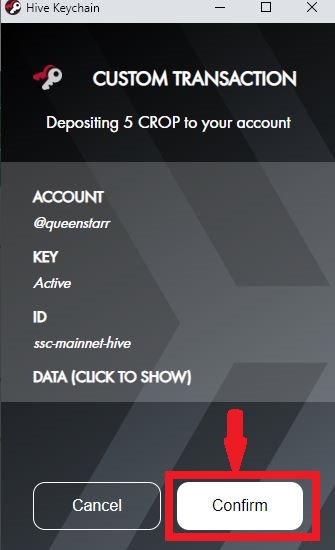
* Hive-keychain will prompt you with Custom transaction verification, Click **CONFIRM** as indicated by arrow :arrow\_right:**4**
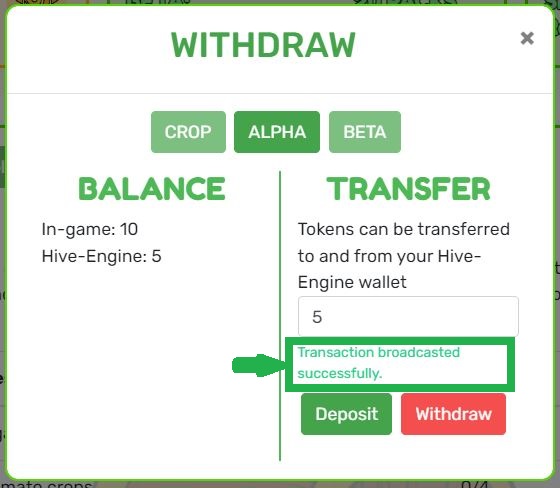
You will receive a **TRANSACTION BROADCASTED SUCCESSFULLY**. Close dialog box (**X**) and refresh dCrops website \[sometime the Hive-Engine may delay, refresh until pack counts In-game. **Do not repeat deposit action only IF it says FAILED**]. Go-to and open your Alpha pack.
{% hint style="info" %}
The Above **DEPOSIT** process is the same for withdrawal, only here, you Click on **WITHDRAWAL**
{% endhint %}
{% hint style="success" %}
The Above **ALPHA PACK** Process applies for **CROP TOKEN** and **BETA PACK**, deposit and withdrawal respectively.
{% endhint %}